
From Evernote to Obsidian and Beyond: My 8-Year PKM Journey
I wrote this a year ago. Since then I've learned something more important — knowing when a tool doesn't help.
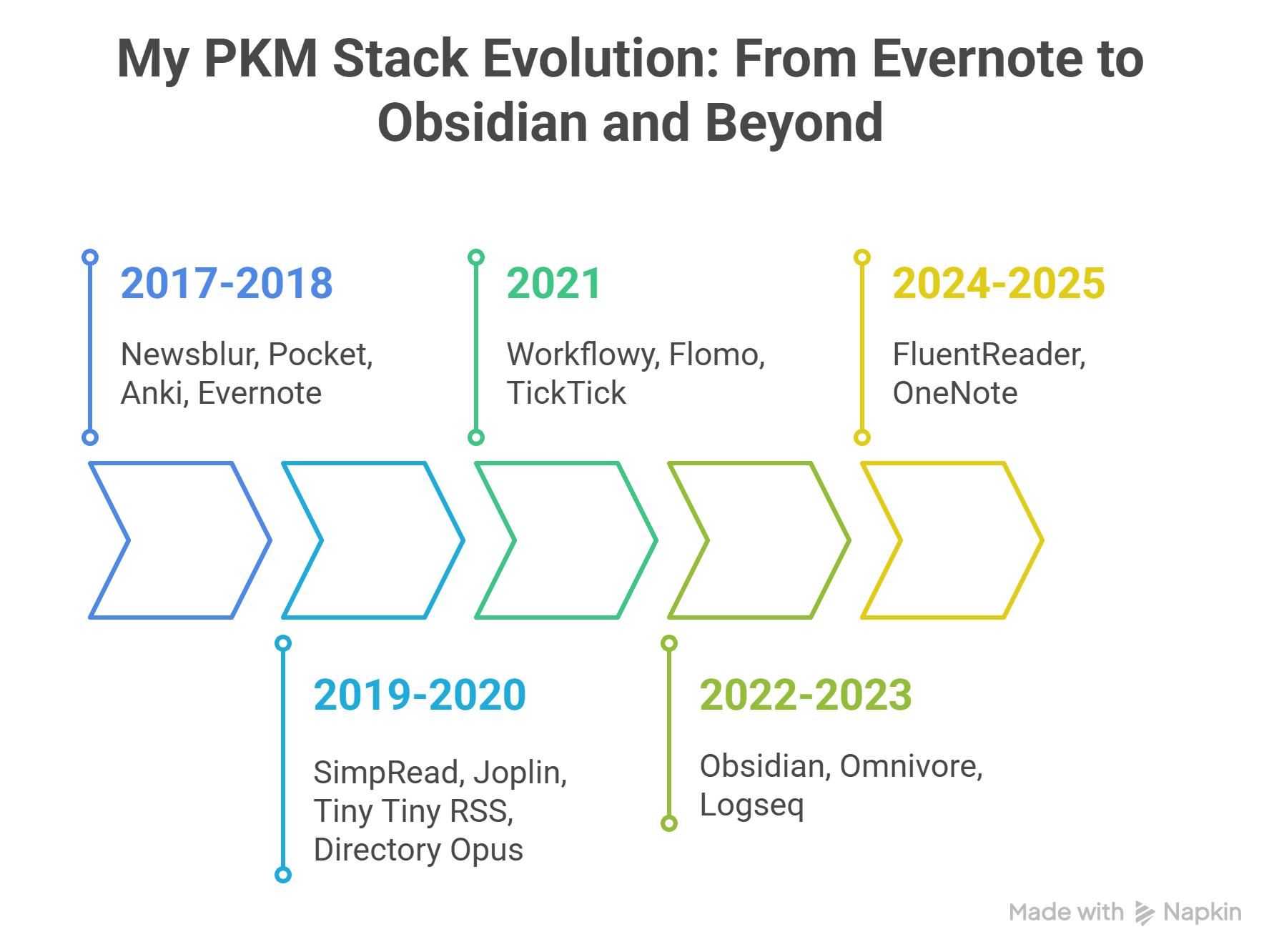
By the Shore of Knowledge
Having grown up on the internet's gift of open knowledge—and spent years as a hands-on learner, a curious builder, and later an educator—it feels like my turn to give something back.
So let me start, as teachers often do, with a question:
Have you ever wondered—how do search engines make sense of our messy questions and turn them into organized results?
Here's one way to look at it—through an artist's creative choice:
When drawing a flying bird, should we study its body structure first, then plan the details—or sketch a basic outline and refine it until lifelike?
(This question mirrors Jun Wu's exploration in The Beauty of Mathematics in Computer Science, where he contrasts two mathematical strategies—one detailed and systematic, one flexible and iterative—as presented in the Chinese edition I read.)
One day, as I sat in the university library reading Wu's book, I didn't yet realize it would mark the starting point of my personal knowledge management journey.
After finishing the book, I came to understand two key insights:
- Search engines blend both approaches—first identifying key elements like recognizing a bird's wings and beak, then dynamically adjusting proportions—to decode our queries.
- They rank pages through probabilistic matching and authority evaluation, creating an ever-improving results order.
With this realization, I began refining my search habits:
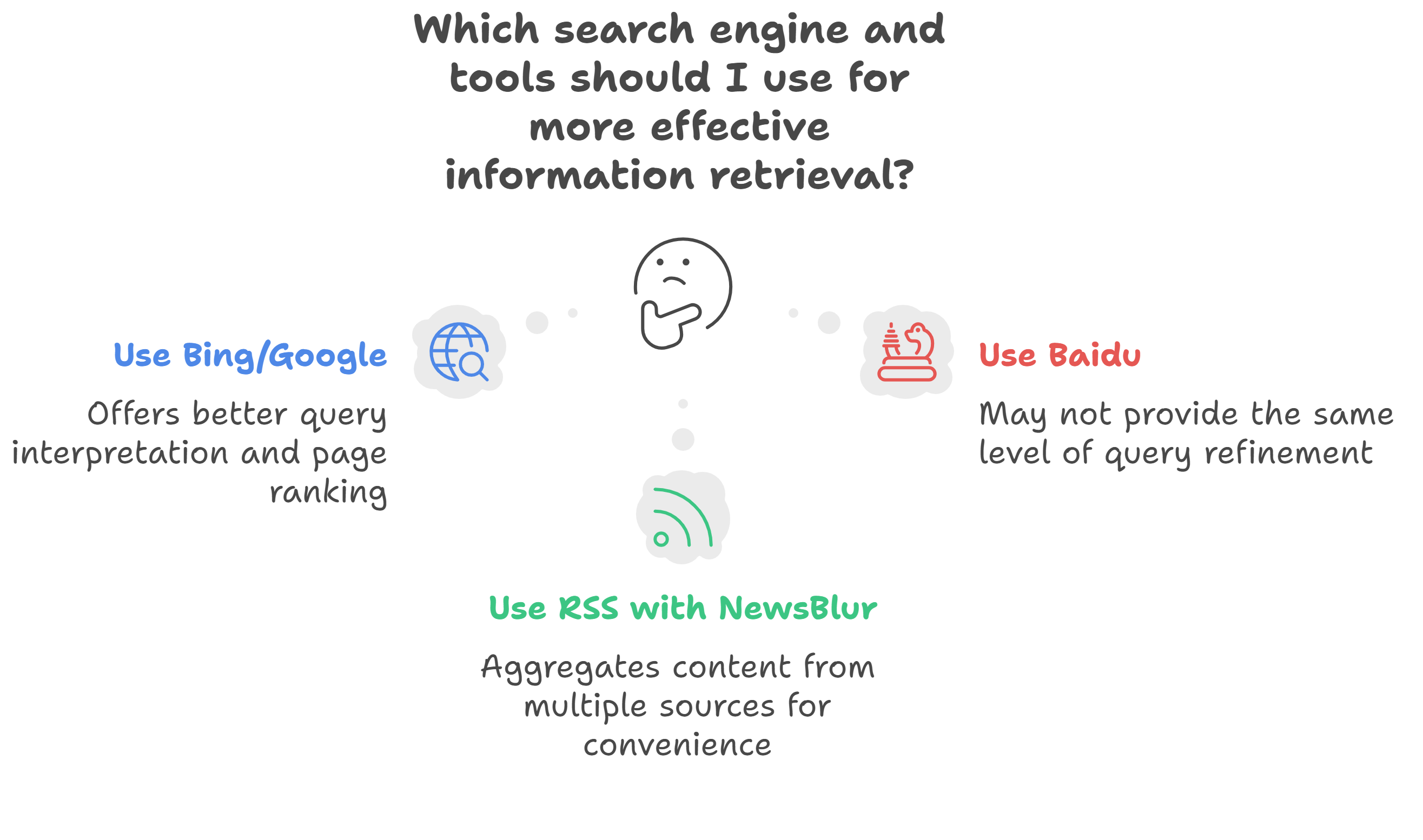
Additionally, I learned basic search operators to refine my queries, such as using site:[domain] to focus searches on specific websites for more targeted results.
At that time, my improved search skills also led me to discover niche software like Anki .
When I wanted to learn how to use Anki, here's what I did:
- Find a high-quality, specialized tech platform—like sspai (a Chinese site) .
- Use the search query
Anki site:sspai.comto dig up useful tutorials.
Then, I could easily spend half a day in the library reading through them.
At the first stage, I didn't even have the concept of 'knowledge management' in mind yet. But when I applied the CODE framework to organize my process, my information workflow started to take this shape:
| Stage | Tools & Description |
|---|---|
Capture | • Search operators • RSS feeds • Evernote Web Clipper • Pocket (Read-it-later) |
Organize | • Evernote (Folder hierarchy) • Pocket (Tagging system - light) |
Distill | ❌ |
Express | ❌ |
Strictly speaking, back then, I was probably just a little girl picking up seashells at the shore of "knowledge management."
The Tool Shapes Me Too
(This title is inspired by "The medium is the message"—a theory from communication studies.)
Markdown
In the second phase, I came across Markdown (a markup language).
It freed me from my obsessive need to constantly adjust font sizes while writing, allowing me to focus more on the text itself (reducing my resistance to output).
I later realized that Markdown, for me, was somewhat like the "invention of electricity"—because it practically reshaped my entire knowledge management toolkit.
After adopting it, I migrated my Evernote documents to Joplin (which is more Markdown-friendly). Another reason was that Joplin allows me to store documents locally on my computer, which feels more secure. However, if I want multi-device synchronization, I have to set it up manually in the cloud (I currently host it on InfiniCLOUD ).
But is it really safer?—What I won't tell you is that, as a tech novice, I once messed up the synchronization order. At one point, my Joplin mobile app hadn't been synced for a long time, and I accidentally overwrote a newer cloud version with the outdated one from my phone. In other words, if I hadn't backed up my files, nearly all my documents would have been lost. I had a similar issue once while using Anki.
In reality, I treat Joplin more like a "cross-platform Markdown reader" because I use Typora for editing and manage my Markdown files in a folder structure using Directory Opus.
One downside of using rendered Markdown is that it's spoiled my eyes—now raw text feels harsh. When I discovered the Simpread extension, I was thrilled because it allowed me to save web pages directly as Markdown. Although Joplin Clipper can do this too, I prefer the following workflow:
- Use Simpread to capture the page,
- Organize and filter it in Directory Opus,
- Finally, import it into Joplin.
At that time, my broken English somehow survived GitHub's UI. After struggling with keeping Joplin in sync across devices, I started experimenting with Tiny Tiny RSS to enhance my RSS reading experience.
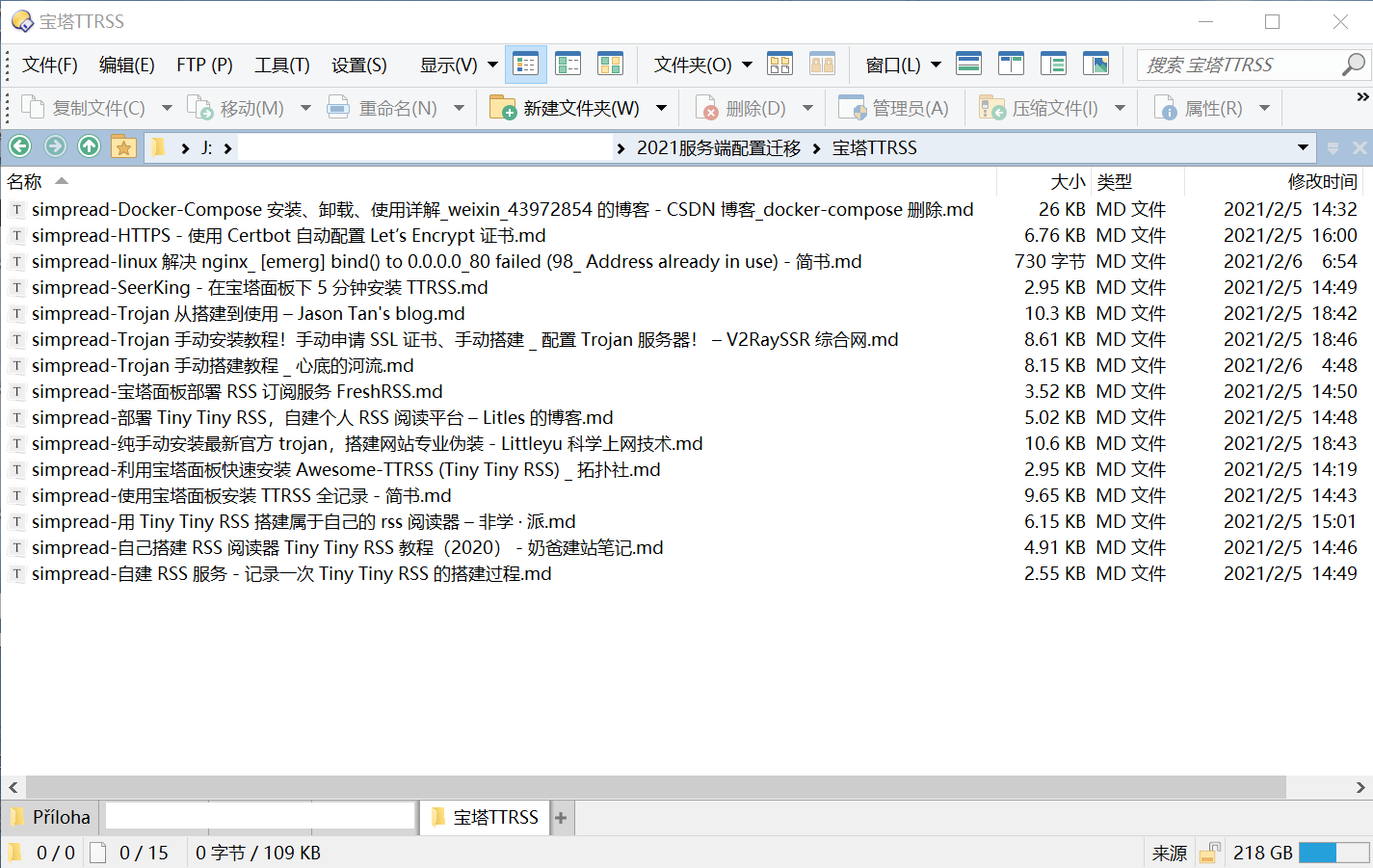
I first searched for tutorials online, then captured them with Simpread. Later, when I opened my folder, I saw a long list of file names. Whenever I tried to recall a specific article, I'd end up trapped in a cycle of opening files one by one—a tedious process that tested my patience to the limit. Fortunately, Typora's sidebar allowed me to quickly switch between all Markdown files in the same folder, speeding up the process.
At this point, you might notice the key difference between managing Markdown files in a file manager like Directory Opus versus a note-taking app like Joplin—using "tags" to categorize each file is much harder in the former.
At my first glance, the file list in the file manager appears like this:
Filename 1
Filename 2
Filename 3
Beyond the filename, they all seem identical—presented together on the same level.
At the time, I used a tool called "QuickLook" that let me preview Markdown content instantly by pressing the spacebar. After reading through all the files, I finally found the one I needed.
"You cannot step into the same river twice." → "I cannot step into the same file twice."
After going through all the files, my mental perception of them changed. In my mind, they now looked like this:
 File 1, Importance Score: 0.5
 File 2, Importance Score: 0.3
 File 3, Importance Score: 0.8
And since 0.8 > 0.5 > 0.3, I opened File 3 and took action. I believe my brain had subconsciously "tagged" each file—my brain scored and ranked them, even though I couldn't see the process.
Now, I primarily use Obsidian to manage my Markdown files. But I'd say my core workflow hasn't changed—it's just that Obsidian conveniently allows me to complete those three steps with its plugins or built-in features.
And—Obsidian's graph view visualizes the process of how our brains assign importance to files, like this:
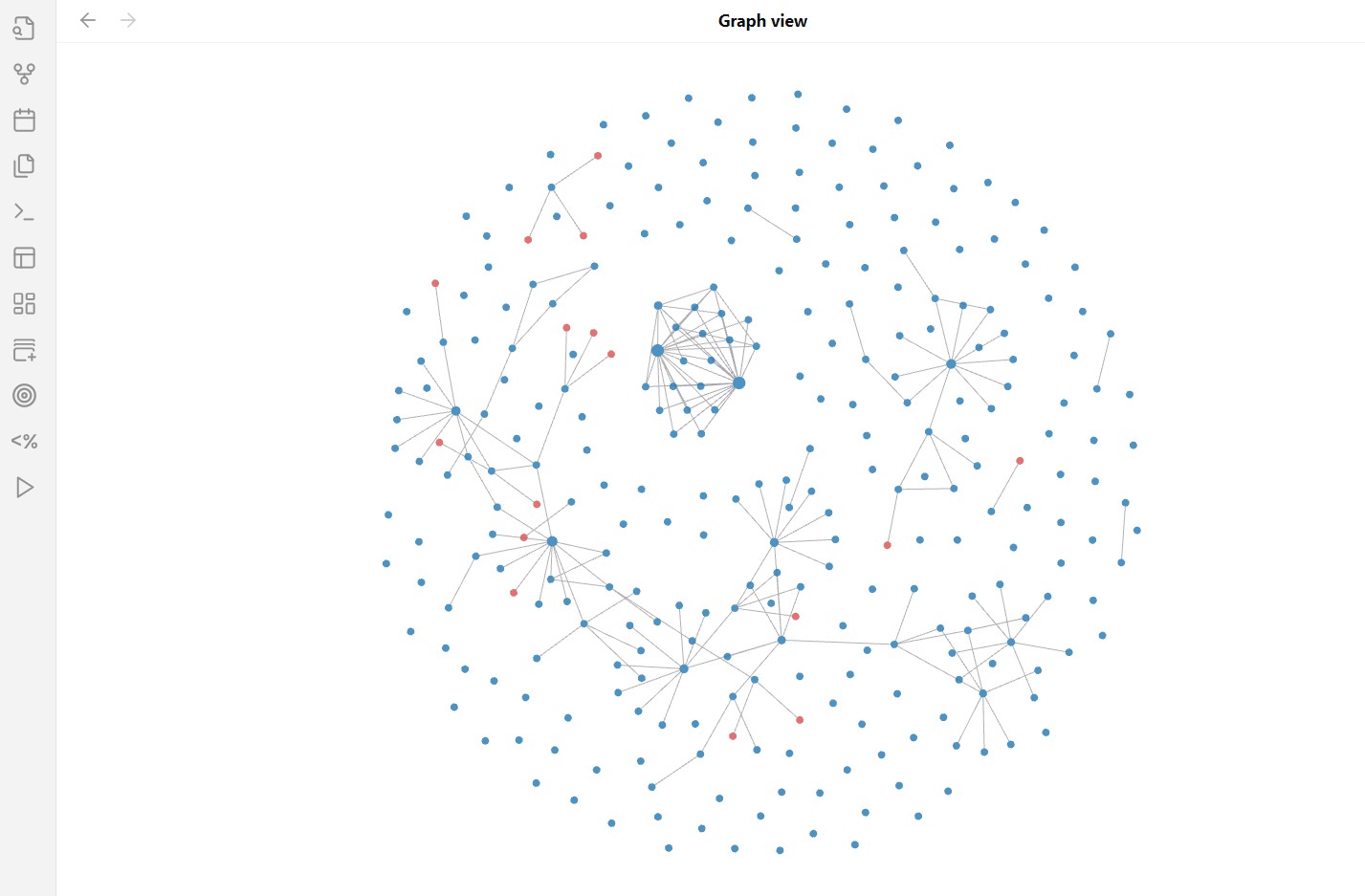
Markdown files arranged in folder hierarchies might seem like they're spread out on the same level, but Obsidian subtly suggests otherwise. Ideally, the largest node in the graph likely represents the file or task our mind has already ranked the highest—doesn't it?
Bullet Point
If Markdown is my reliable grain silo, then bullet points are my agile light cavalry—quick to deploy and effortless to rearrange.
Workflowy cracked open a window for me—this is what bullet points were always meant to be: lightweight, fluid, alive.
Yes, Markdown allows bullet points too, but their static nature can't keep pace with how often my mind shifts direction (or how quickly I need to revise).
What makes Workflowy different is how a bullet point can instantly collapse or expand. This lets me temporarily "hide" chaotic ideas—clearing my mental workspace visually—while knowing I can always recover them later through search.
It even rekindled the joy I felt as a child, playing with colorful knock-off building blocks.
Dragging bullets to adjust hierarchies feels less like writing and more like assembling blocks—each one snapping into place with a quiet kind of satisfaction.
Today, you build a race car with red, yellow, and blue blocks to show off to your friend Tony. Tomorrow, you take it apart and turn it into a house, then invite Jenny's toy people to move in.
If you can't find a roof in the pieces from your race car, you either buy one—or just tell Jenny, "Don't worry—we'll add a roof later."
AI tells me this kind of operation is essentially "minimizing information units + dynamically recombining them with freedom."
I think that's probably why Workflowy is so good at organizing "content blocks."
Traditional folder structures force ranking by limited dimensions: file size, type, modification date... but never by "how much this matters to me," right?
While writing my thesis, Workflowy helped me bypass this limitation. I used Quicker's shared actions to extract filenames from dozens—if not hundreds—of papers into Workflowy. Listary (a rapid file-search tool) let me open any paper instantly with a double Ctrl search.
By dragging bullets, adding tags, and collapsing sections, I grouped papers by theme and annotated them directly in Workflowy. When I returned to my thesis a few days later, those annotations told me exactly where to resume—no digging through folders required. The method wasn't perfect, but it allowed me to continuously reassess priorities.
This experiment became the foundation for how I later adopted tools like Logseq and Flomo—less about rigid structure, more about fluid thinking.
Prioritize Retrieval Over Classification
Back when I was using Joplin and Evernote, I relied heavily on folder structures to organize my notes/clippings. To make them appear more systematic, I even referenced the Dewey Decimal Classification (DDC) to name my folders—just like how librarians categorize books with classification codes:
"301 Sociology"
"100 Philosophy & Psychology"
"641 Food & Drink"
"370 Education"
But what if an article covered both sociology and psychology? At the time, I would force myself to categorize it based on intuition—just to keep my interface clean. I also enjoyed the satisfaction of "collecting academic articles," as if I were building my own library. And then? Nothing.
This "academic taxonomy" approach also aligned with my mindset as a university student—I was essentially classifying for the sake of classifying.
When my collection of saved articles started piling up, I realized I was spending most of my time just figuring out which category each one belonged to.
Then it hit me—since an article can have multiple tags, why not use the DDC system for tagging?!
So I started doing this:
Article 1 → #301 Sociology, #100 Philosophy & Psychology, #Unread
I could almost hear God sighing... Yes, I had fallen into the trap of obsessively tagging articles.
After finishing Article 1, I'd remove #Unread and add #Finished. And then? Again, nothing.
This is why I believe I never truly utilized "tag hierarchies" in Joplin or Evernote.
To truly reuse a content block (rather than just storing it), what should this block have at the "note management" level?
- Tags?
- A refined title after reading?
- Or the seemingly more mystical "bidirectional links"?
Instead of focusing just on the tools of "note management," let's reframe the underlying idea as "marking."
If we ask, "Why do we mark things?" the immediate answer is clear: to access them faster. But the more profound question is: How does our brain actually enable this retrieval? What cognitive processes are involved?
That's where something like a 'Memory Hook' comes in.
Introducing the "Memory Hook" – An Intangible but Powerful Tool
Though it's a psychological concept, you might already be familiar with it. Remember how your English teacher explained a new word using simpler, more familiar terms?
After that explanation, the word suddenly clicked. And the next time you needed it, recalling it was easier. When the teacher asked, you were able to answer with confidence.
Your teacher was building a bridge between what you already knew and what you were about to learn—that's the "Memory Hook."
If the teacher failed at this, the class would fall into silence—because no one could connect the new concept to existing knowledge.
A Personal Example: Next.js
While writing this article, I actually considered building a personal website just to publish it. As I searched for tutorials, I came across the term 'Next.js.' . As a beginner in IT, it just looked like 'N-e-x-t-dot-j-s' to me.
My first instinct? Ask the all-knowing AI teacher—"What is Next.js?"
AI: "Next.js is a React-based JavaScript framework for server-side rendering (SSR) and static site generation (SSG)."
Realizing I've asked the wrong question, I rephrased:
If I'm a beginner who only knows basic SQL, how would you explain Next.js? How would you position SQL and Next.js within a foundational CS learning framework?
The AI gave me this table:
Computer Foundation Architecture: "Factory Model"
| Layer | Function | Tools/Technologies | Analogy in Factory |
|---|---|---|---|
| Data Storage Layer | Store and manage data | SQL, Databases | Warehouse Manager: Organizes and safeguards raw materials (data). |
| Logic Processing Layer | Handle business logic and computations | Python, Java | Workshop Worker: Processes raw materials into intermediate products. |
| Application Interaction Layer | User interfaces and interaction logic | React, HTML | Sales Counter: Displays finished products and interacts directly with customers. |
| Network Transport Layer | Data transmission and communication | HTTP, REST | Logistics Department: Transports materials between workshops and counters. |
| Deployment & Operations Layer | Runtime environment and resource management | Docker, AWS | Factory Director: Coordinates the entire production process. |
Suddenly, it clicked—I realized where I am and how to hook into Next.js. My prior learning from Fundamentals of University Computer Science came back to me.
This table is essentially a "Memory hook," which made me appreciate how effective AI can be as a teacher.
However, this example isn't a challenge to systematic learning—I still hold it in the highest regard!
Coming back to note management—here's a gentle question to linger with:
Do those carefully crafted tags and headings really act as "Memory Hooks," or do they sometimes drift into abstraction? When do they bridge ideas seamlessly, and when do they leave us stranded in our own archives?
Sometimes we overlook the knowledge frameworks we already have—and how I wish, back then, that instead of reflexively labeling an article as 'sociology,' I had paused just long enough to ask: Wait—what does this article actually mean for me?
Now if we stand on the shoulders of psychology and look at this question:
What makes a good note-taking tool or workflow?
Ideally, the answer might be something like this:
If it helps us recall and contextualize our existing knowledge while also reducing memory load—freeing up mental energy for higher-order thinking like evaluation, synthesis, or decision-making—then it's probably a good one.
The Power of Habit
I first encountered the concept of an "all-in-one" solution through Notion, using its calendar board for journaling and managing to-do lists. Its minimalist design and playful emojis even provided comfort during the stressful months leading up to my university graduation, as I juggled thesis writing and job hunting.
When I started working, my workflow faced new challenges: How could I keep my system running smoothly when my willpower was at its weakest? As tasks grew more complex and mobile-dependent, I shifted my to-do list management to TickTick's mobile widget.
Despite my enthusiasm for all-in-one tools, I ultimately surrendered to the power of habit. I needed my task list instantly accessible the moment I unlocked my phone—especially when exhaustion tempted me to open YouTube instead. So, I let go of the obsession with consolidating everything into a single app. Note-taking tools stopped doubling as bookmark managers, and each tool naturally found its place in my routine.
My workflow remains desktop-first, with mobile devices handling supplementary tasks. As an Android user wary of cloud storage, my biggest frustration was cross-device file transfers. After trying Feem, Anywhere, and Pushbullet, I surprisingly found my ideal solution in a team collaboration platform—Lark (Feishu).
Eventually, I even reverted to an ancient human habit—handwriting.
The debate between handwritten and digital notes is ongoing. As an educator, I've pondered arguments like:
"Handwriting works with the brain's natural flow: the act of writing by hand boosts memory, and letter shapes mirror how we process visuals—helping information stick."
Or even: "Black-and-white writing reduces color distractions, sharpening logical thinking."
But for long-term retention, I don't see handwriting and digital notes as opposites. Apps like Anki, which leverage spaced repetition based on the Ebbinghaus curve, enhance recall—and digitized notes integrate seamlessly into Anki.
I put this mindset into practice while learning Czech.
During A1-A2, I focused on handwriting to cement Czech's tricky soft consonants (like ď, ť, ň) through muscle memory. By B1-B2, after mastering grammar basics, I switched to digital tools like Anki for efficient vocabulary building.
Along the way, my tools and systems evolved too. I've now consolidated my Czech handwritten notes (scanned versions) and digital ones (including handwritten notes from my iPad) into OneNote. To my surprise, its Chinese search function can even recognize and match handwritten content in my PDFs. This has helped me overcome the limitations of paper and device fragmentation, bringing all my scattered notes together in one place—easy to access whenever I need them. One day, when repeated practice internalizes the language, I'll archive everything in my "SSD" (a.k.a. my brain) and start fresh with new content.
Now, you might be thinking: "Aren't you overcomplicating things? Why not just pick one method and master it?"
Maybe. But I enjoy these experiments—analyzing learning materials, selecting strategies, and optimizing workflows is second nature to almost every teacher.
Embrace the Chaos
Capture
In order to help my brain capture information that's closely tied to my current task or theme more quickly and smoothly—and since I stick with a desktop-first setup and haven't managed to go fully "all-in-one"—I focus on making smart use of each software's unique features. At the level of window operations, I aim to create a seamless experience that builds an illusion for my brain: that I'm seemingly "all-in-one."
My Desktop-First Workflow: Bridging Tools with the Operational Triangle
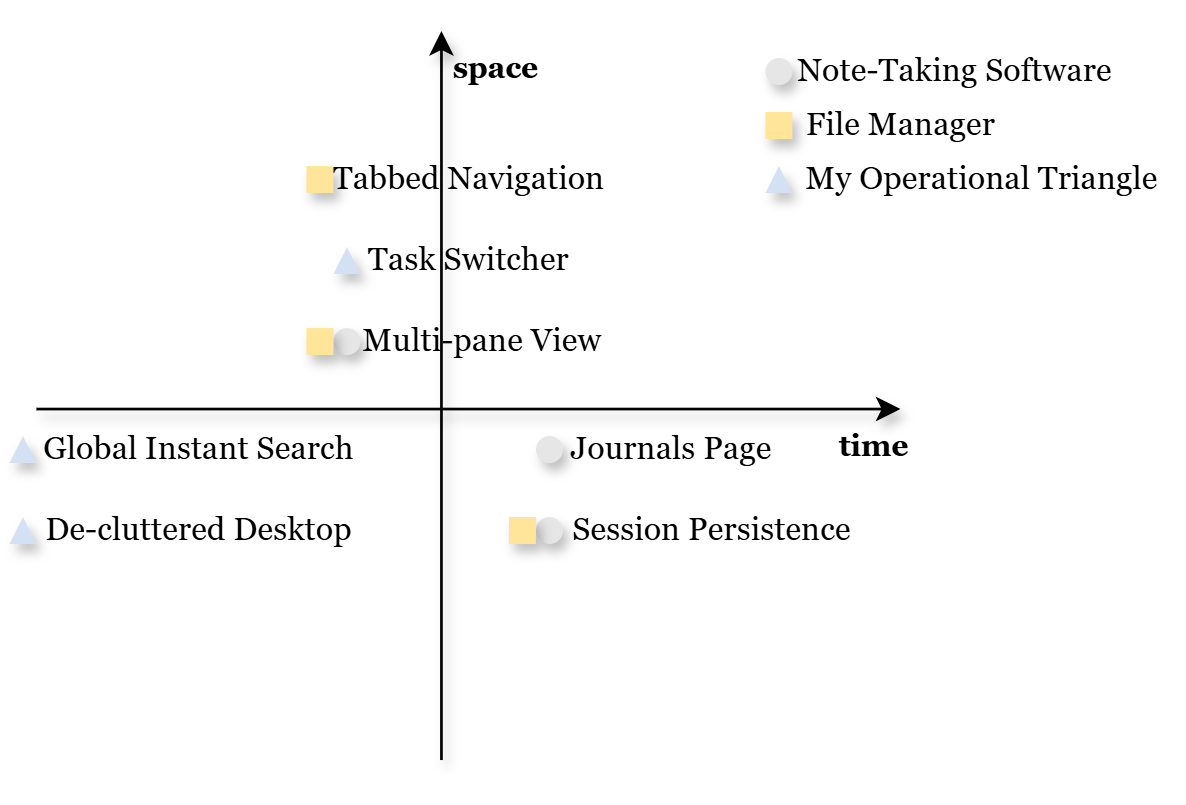
My Operational Triangle (Search • Switch • Declutter)
With a global search tool like Listary, I keep only folder icons on my desktop, grouped into three categories. The central group holds folders tied to active tasks, turning the desktop into a visual anchor—a subtle prompt for what's next.
I often press Alt + Tab and pause briefly to mentally map my next move before switching windows. After several rounds, if I feel my focus slipping, I hit Win + D to reset—then jump back in. This simple rhythm keeps my workflow intentional and adaptive.
To maintain this momentum across sessions, I rely on persistent layouts in tools like Directory Opus and Obsidian. They help my mind know exactly where to begin—minimizing friction. The Journals page in Logseq carries that continuity forward, while Flomo's time-sorted Memos design lets me reflect across the river of time, tracking how thoughts evolve.
Spatial efficiency also plays a role. The multi-pane view in Obsidian and the Win + →/← hotkey make better use of screen space. Paired with tabbed navigation in file managers like Directory Opus and Clover, I can move smoothly across distinct workspaces without losing context.
And when clarity calls for quiet, I just tap F11—immersing fully in a single-window flow.
Organize
Actually, there's another method I use that's even faster than global search: a kind of mental script I've internalized over time.
One day, I asked my team leader to review a Word file I'd just shared. She opened the shared folder and asked, "Wait, which one is yours?" Without missing a beat, I sorted the folder by time, hit Enter on the top file, and we jumped straight into the content.
After repeating this while helping others locate files, I started to realize I'd developed an internal habit: I skip over filenames entirely and go straight to sorting by modification time. This came out of my long-standing workflow—I treat downloading and organizing as separate steps, and I often end up with a chaotic pile of files. Many filenames are messy or even unreadable, and my brain doesn't really extract much from them. Needing a fast way to find what I'm looking for, I naturally developed this shortcut to navigate the clutter more efficiently.
What started as a simple time-sorting trick eventually shaped how I organize everything—especially on my external drive. Over time, I noticed that sorting by time also helped me form stronger mental associations with files. I began using a "timestamp + filename" naming format to reduce nested folder layers. It acted as a kind of dual-access trigger, helping me reach files faster—though I didn't fully realize why it worked at the time. (Filenames in the image below are hidden)
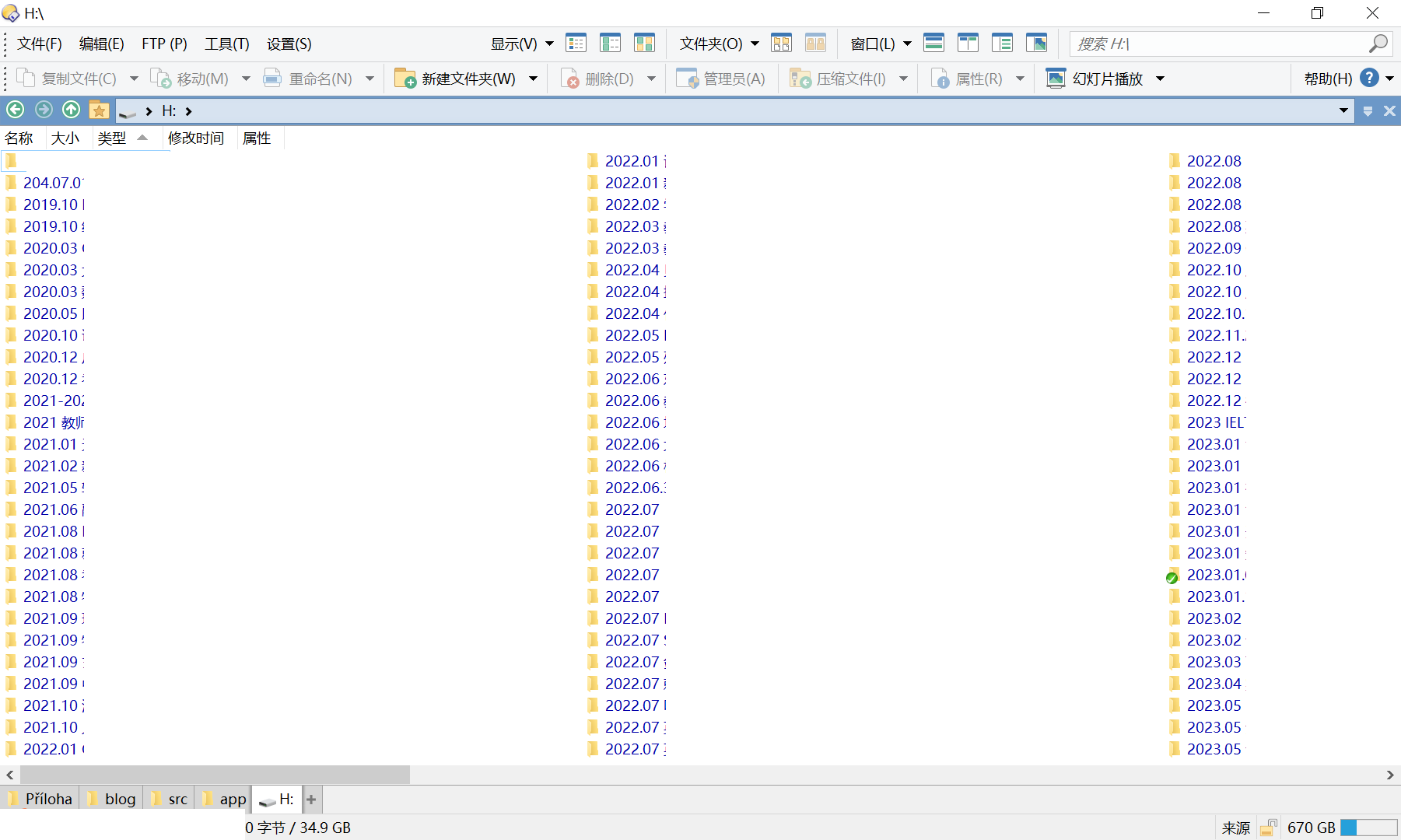
When I can't recall a filename, I usually scan the surface structure of the drive first, then make full use of search tools—like filtering by file type or using advanced search options—to track it down.
Navigating the Forest of Ideas: On Attention, Tags, and Temporal Thinking
Imagine this:
You're walking through a dark forest, guided only by a moving beam of light. Your goal is to find a way out. The light reveals just a sliver of the path at a time. You spot three possible trails—A, B, and C. Trail A looks promising.
You switch to a smaller, faster flashlight. Now you're sweeping the scene more lightly—still focused on A, but also tracing the outlines of B and C. If your mind can move quickly enough(2), keeping pace with the shifting beam, you begin to piece together something like a daytime map: a clearer, more interconnected sense of where you are.
(In this metaphor: the forest represents the space of ideas; the searchlight is focused attention; the flashlight is floating attention.) (1)
This kind of mental agility—tracking multiple shifting paths—mirrors the way I manage attention in real tasks.
"The above scene" stems from my reading notes on — How to Take Smart Notes:
(1) We assign different types of attention to different tasks—both art and science require focused attention (e.g., editing) as well as floating attention (e.g., ideation, writing).
(2) But every time we shift our attention, it takes a toll: transitions become less efficient, and regaining focus takes longer.
To deeply organize ideas, I've found it essential to balance focused attention with floating attention—each mode supports a different kind of cognitive navigation.
During my organization phase, I began using tags as a kind of transitional marker—initially in Workflowy—to distinguish what counted as a"real tag."What began as a simple, intuitive marking system evolved into a way to contextualize scattered notes.
At an operational level, these tags started to function like modular containers—spaces that naturally call for more focused attention.
Actions like "jumping between tags," "zooming in/out," and navigating "back and forth" across entries—especially within previously defined dynamic information units—create a kind of seamless, fluid motion. This supports my floating attention, allowing me to shift across ideas without losing coherence.
What's more, embedding tags within the journal pages of Logseq (and Flomo's time-sorted memos) has gradually changed how I tag. In the past, relying on a rigid file hierarchy made tagging feel more formal, more static. But now, tagging during input allows me to lay groundwork for future organization without even realizing it. Time-sequenced entries offer rich cues for later reflection, while also leaving room to restructure them later.
This is where the app's architecture and my intentional practices begin to align: enabling me to continuously re-evaluate priorities and convert brief shifts of attention into concrete actions.
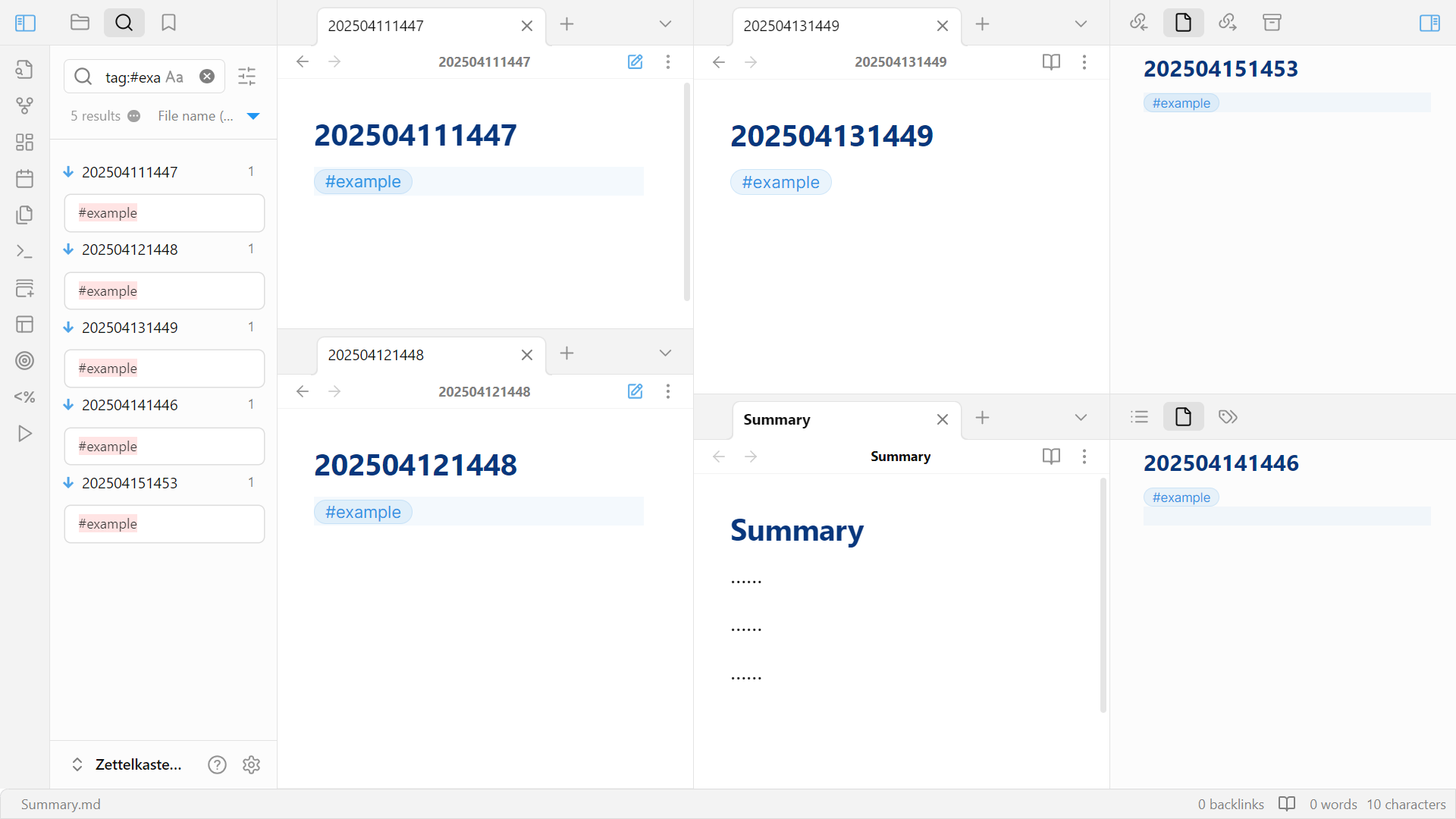
I shared a draft of this section with AI, which generated a related article—Coupling PKM Software with Cognitive Structures. That sparked a thought: perhaps time-ordered information provides a more stable structure for contextualizing ideas. Even in Markdown-based apps like Obsidian, this approach can be replicated—by quickly creating unique notes with hotkeys. Though tags in Obsidian act more like hyperlinks than true containers, its multi-pane view still supports multi-layered thinking in a way that reinforces attention, just like:
This all reminded me of something I had come across long ago: the Single Notebook Method proposed by Japanese author Nobuyuki Okuno (奥野宣之) in his book How to Organize Information Effectively. I first encountered it before I discovered Logseq or Flomo—but dismissed it at the time, assuming it was only relevant for paper-based systems.
Okuno's method emphasizes: "no categorization—just record": write everything in one notebook, chronologically, without pre-sorting. (generated by AI)
This made me wonder whether a broader conceptual framework connects these systems. According to AI, there's no standardized academic term, but it did point me to Progressive Summarization, a method developed by Forte Labs to enhance the discoverability of notes.
When we align Okuno's Single Notebook Method, the journal-page design of Logseq, and the layered summarization approach from Forte Labs, I can't help but feel that—regardless of their origin—these methods point to a shared cognitive intuition. A pattern that transcends paper and digital, East and West.
They all seem to echo a deep mental habit: to anchor knowledge in time, and to refine meaning progressively.
Distill & Express
Back when I was still at university, I often had the luxury of uninterrupted time to directly distill information from a single article. That's when I wrote this note card:
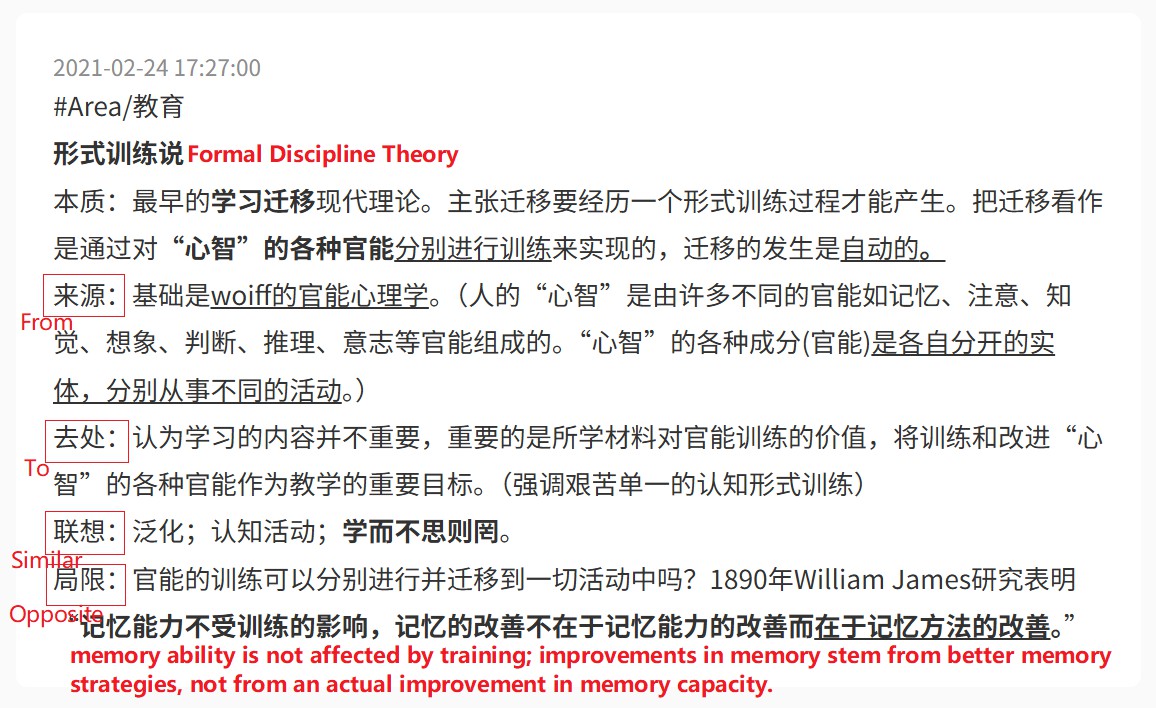
At the time, I used a framework that prompted questions like "Where does this knowledge come from?" and "Where does it go?"—which I filled out mechanically, card by card. Most of my effort went into completing the structure itself, not engaging with the content beneath it.
But when I revisited this card later, it felt oddly unfamiliar. Though seemingly complete, it left me unsure how to take it further. I stumbled across it in a Flomo backup on my SSD while collecting material for this piece—a reminder of how deeply it had been buried, both literally and mentally.
Now I see I didn't archive it because it was "too knowledge." Rather, through the lens of the DIKW framework, it was still just structured information—not yet internalized as knowledge.
Key Distinction Between "Information" and "Knowledge" in the DIKW Framework (AI-generated summary)
Summary:
Information: Static, discrete facts (answers What/When/Where).
Knowledge: Dynamic, systematized understanding and application (answers How/Why).
Core difference: "Information is data made meaningful; knowledge is information made actionable."
Examples:
Context Information Knowledge Weather 80% chance of rain tomorrow With high rain probability, drainage systems should be cleared in advance to prevent flooding Stock Market A company’s stock fell 10% today The company’s earnings missed expectations—short-term caution is advised Health Average daily steps: 5,000 Below the recommended level—adjust exercise to improve cardiovascular health
Anchoring Meaning: On Frameworks, Friction, and Emerging Notes
That mindset lingered even as I explored linked note-taking systems. At first, I built my notes from the ground up, beginning with a foundational layer of Maps of Content (MOCs)—essentially index-like pages.
Then one day, I came across that "knowledge-from-to" framework again—this time in a video by YouTuber Vicky Zhao, who introduced her friend's "Idea Compass" as a way to navigate thinking.
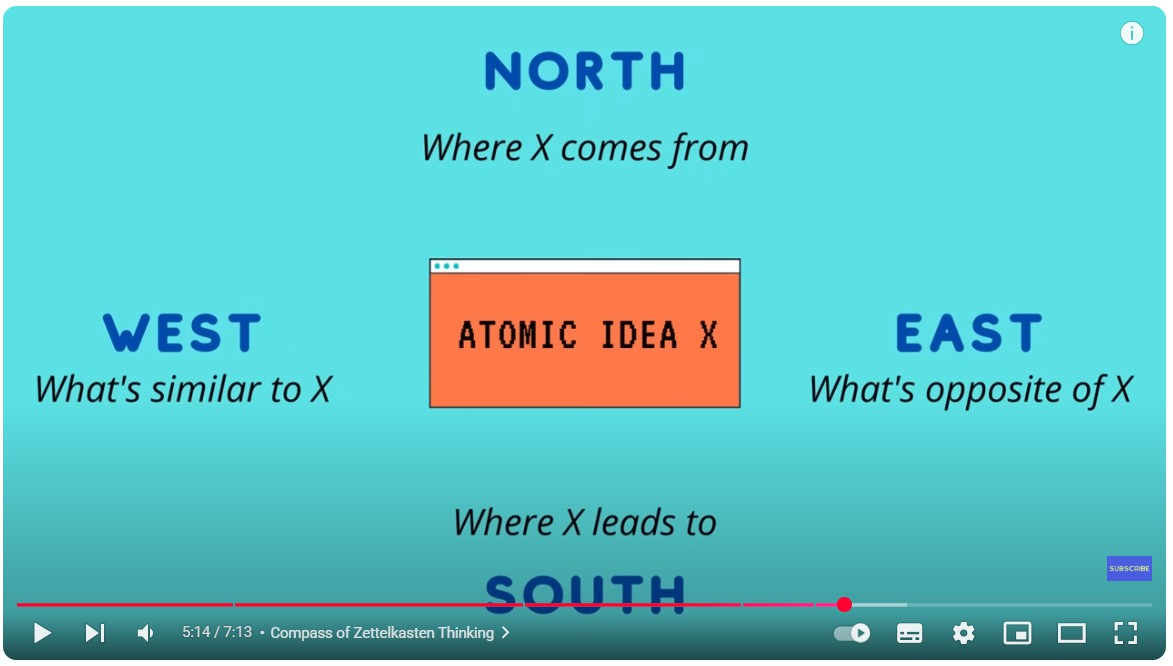
Something in the way she spoke about it struck me. It wasn't just a tool—it reframed how I saw connection and structure in my notes. Here's an example of how I used to structure them:
        ⬆ ①Map of Content                    ②Existing Note2 ⬇
        [[existing note1]]             North: [[existing note1]]
        [[existing note2]] ⤴           South: ⚠️[[unknown note1]]
        [[existing note3]]              West: [[existing note2]]
                                        East: ⚠️[[unknown note2]]
(Defining opposites or anticipating where an idea might lead was often, for me, difficult—so in my system, those directions were frequently left open or marked as tentative links.)
The deeper impact, however, was that this practice revealed a blind spot in my note-taking: I was prioritizing structure over engagement.
What really matters in card creation isn't rigid form, but something more foundational:
- Capture freely: Don't overthink structure—let the idea emerge first.
- Build the habit: Early consistency matters more than early perfection.
- Internalize gradually: Atomic notes clarify ideas, but doubts about whether a note is "atomic enough" shouldn't prevent recording.
- Connect actively: Link notes in ways that deepen thinking and gradually reveal a network of insight. Step back, see the whole elephant—and reflect beyond disciplinary borders.
Since then, my graph view has begun to bloom with more and more "red notes"—organic connections shaped by lived experience.
A Small Example:
2025 – Annie's Birthday Plan
Up: [[friendship management]]
Down: [[2026 – Annie's Birthday Plan]]
One day, while reviewing your journal, you remember that Annie's birthday is coming up. You create this note. Later, you add: related: [[2025 – Lisa's Birthday Plan]].
Fast forward to 2026—preparing for Lisa's birthday, you borrow elements from Annie's note. By 2027, Annie's plan has grown with gentle memories. You collaborate with AI to turn them into a video or playlist.
And by 2029, looking back, you see how years of small acts have created a dense, emotional web. That's when a new piece took shape: "8 Subtle Ways to Make Friendships Last"
In fact, as someone outside a knowledge-heavy field, this simplified version is closer to how I actually use linked notes in daily life. It's not about building a knowledge fortress—it's about building a memory garden.
What's interesting is that I eventually noticed a theoretical anchor for this way of thinking within my own field: scaffolding. Though spatial and temporal concepts are mastered young, perhaps they can still serve as permanent cognitive scaffolds in our lifelong inquiry.
Scaffolding is an instructional strategy where learners shift from external structure to internal autonomy. By removing support gradually, educators help students move from imitation to independent creation.
It Is a Circle
Addressing Needs or Cultivating Strengths?
This isn't just a dilemma in my major field—special education—but also a reflection of my own career crossroads.
Should I start working right away or take a gap year to pursue a master's degree? I wrestled with this question for months as graduation season drew to a close.
It was during this time that I came across the PARA method in the digital garden of the Flomo founding team. Though I had known of it before, it was through their interpretation that I came to truly appreciate its value. I quickly reorganized my note-taking system using PARA. Under this structure, I no longer relied on tags to categorize new notes. However, I also realized that many of my so-called "Projects" were not clearly tied to concrete actions—they were more like placeholders than actual goals.
That summer, I dove into Plidezus's content, the work of Flomo's founder—his articles, online talks, and the book behind it all, How to Take Smart Notes. Through this, I began to explore the Zettelkasten system in depth.
Two ideas especially resonated with me:
"If you don't have a real problem to solve—or a field you're genuinely focused on—then knowledge management is just an illusion."
—Plidezus, From Goals to Tools to Methods: A Decade of Knowledge Management as a Product Builder
"Developing a growth mindset—actively seeking and embracing feedback—is one of the most important factors for long-term success and happiness."
—How to Take Smart Notes (Chinese edition)
This made me reflect: if I were to pursue a master's degree, what core question would I want to solve? I keep coming back to this, but still haven't found a definitive answer.
Although many around me felt I was more suited for academia, I chose to become a vocational high school teacher—because being a teacher means not only designing learning experiences but also being directly involved in their delivery. And along the way, I've received plenty of raw, unfiltered feedback that continues to shape me.
The PARA Method: A Universal System for Organizing Digital Information
The Fittest, Not the Best
Looking back, I'm so glad I made that career choice at a critical turning point. It led me into our team's collaborative planning sessions, where I encountered insights from colleagues with all kinds of backgrounds: motor therapy, speech therapy (my own field), and even some who had transitioned from general to special education. Those varied perspectives challenged me—and made me more aware of my own tendency to favor certain instructional mechanisms.
Even though we often had completely opposing views on the same instructional design, we were all coming from the same place: a shared drive to ensure that our team grows, and that our students grow.
I've come to believe that our debates were never about chasing the best solution, but the fittest one. Because in reality, we understand that students have their own learning styles—and teachers have their own teaching styles. It's only when we thoughtfully blend all three—teachers, students, and instructional design—that the plan becomes truly workable. That's when we can really make the most of our time.
Sometimes in my work, I need to step away from the team and take the lead on my own.
Maybe it was my obvious enthusiasm for psychology during the interview—whatever the reason, the school picked up on it and, out of trust, put me in charge of general education courses for the regular classes. They even gave me a fair degree of freedom in how I wanted to design and teach them.
To be honest, I wasn't used to standing in front of students who could interact with me so effortlessly—after all, I'm primarily a special education teacher.
So it was a surprise when I found myself teaching—of all things—mental health, career planning, and even economics and politics.
Naturally, I began with the textbook. It felt like the safest bet—structured, reliable, risk-free. But it didn't take long to realize the printed pages weren't sparking much interest among the vocational students. Especially with topics like these, it felt as if theory was crashing headfirst into reality.
It was like blowing Arctic wind into a rainforest—no wonder the whole class went quiet. By the second half, the silence was so dense, I was ready to melt into the floor—or evaporate entirely.
Postscript:
"The Best Learning Method I've Ever Seen | CLT (Cognitive Load Theory) | Tangzhi on the Essence", available on Bilibili (a Chinese-language video).
After watching it, I realized that part of their silence might've been due to my own misstep: using ill-structured, "why-type" questions too early—questions that likely sparked more confusion than clarity.
After consulting my teaching advisor, I found myself hesitating over whether to adopt a task-based teaching approach. This method shifts the teacher from center stage to more of a behind-the-scenes role, focusing on guiding the process and designing meaningful tasks. As a new teacher, I instinctively fear potential chaos—but that alone isn't a valid reason to resist change. Yet, I'm not convinced that "responsibility" fully captures the weight of these concerns—the word feels too vague to reflect what's actually at play.
On the surface, each class lasts only 40 minutes. But with 50 students plus myself, that adds up to 2,040 minutes. And if we all leave the classroom still confused, that number turns into -2,040. That stark reversal makes it clear how powerful effective teaching reflection can be—it's a lever with real weight. And the switch that activates it? That rests in my hands as the one leading the classroom.
Because I genuinely value our shared time, that awareness pushes me to act.
From this perspective, I now grasp an idea I once encountered in a sociology of education text: education is productivity itself—because I now see time as a real, tangible resource.
Since special education classes remain my main battlefield, the amount of attention I can give to other groups is limited. So I keep asking myself—is there a way for us to stay in our comfort zones, yet still make the most of our time? I believe the key lies in designing tasks that build on my existing skill set. That way, when chaos inevitably strikes, I can quickly grasp the essentials.
1. The topic should be relevant to their daily lives, so they have something genuine to share. If we're covering economics, for instance, a prompt like "Introduce a local specialty from your hometown" can spark engagement and offer a foundation for more specific requirements.
2. Restrict the number of slides and the time limit for each presentation. This forces students to make deliberate choices.
3. Their narration should sync with their slide progression. Even if matching every animation isn't feasible, their speech should at least flow smoothly between subtitles to guide the audience's focus.
The second idea actually came from my exploration of Zettelkasten, and the third was a tip I picked up from an English writing elective at university. I didn't stick with English writing afterward, but that class taught me the value of cohesion and coherence—so the reader doesn't get lost. The same goes for presentations: that kind of flow helps keep the audience on track.
These three points might seem simple in theory, but in practice, outcomes often fall short—maybe around 50% of what I aim for. Besides having to adjust the rubrics based on their performance, group conflicts are pretty common. And I'm constantly reminding them to coordinate font styles, spacing, and background. It's a lot to manage, especially early on. Still, I feel they're slowly starting to warm up and become more engaged.
Sometimes I wonder if I'm too particular about these "small details". But even so, there are always some groups that truly shine—far beyond anything I could've managed when I was their age. Back then, I didn't even have the confidence to speak in front of a class, let alone deliver a full presentation.
Most of the time, I find myself playing the role of the narrator, gently steering students back to the textbook. One day while teaching, my eyes landed on a term tucked quietly into a corner of the page—"deleveraging." It waved at me with a strange kind of familiarity, though I knew it would likely feel abstract and remote to my students.
Maybe it was just a passing urge to lighten the mood, but I suddenly wanted to add a pinch of salt—just a minute or two of something more vivid:
Imagine you start a small shop. After six months, you've earned a decent profit. Now you're faced with a decision:
A. Save the money or treat yourself
B. Borrow a bit more—add some tables and chairs, maybe upgrade the décor or expand the space
Let's say you choose the second option. Another six months pass. If your shop attracts more customers during that same timeframe, you might not only repay the loan—you could even earn 1.5 times more.
That borrowed amount? That's what we call leverage.
Just as I was about to return to the main thread, a few students—ones who usually avoid anything printed—surprised me: "Teacher, can you explain more?"
I did want to continue, but I paused, unsure whether it would feel useful or relevant enough. Still, in their eyes, I caught something quietly asking: why not spend time just being curious?
In truth, my exploration of personal knowledge management is shaped not only by my training as an educator but by the journey itself, which continually reshapes my teaching in unexpected ways.
Fresh from reading a post on Flomo's knowledge‑sharing channel Youzhi Youxing ("Knowing & Doing"), I introduced my students to the idea of a lever.
…In 1602 the Dutch East India Company decided to raise capital from the public, allowing it to amass enough money to challenge the mighty Spanish and Portuguese fleets. Their solution was to split ownership of the company into small portions and issue each subscriber a certificate.
You've probably guessed it—these certificates were the world's first "stocks."
—— "Where Does Money Come From?" (Youzhi Youxing)
The word stocks jumped out at me—as if it had flown straight off an iPhone market ticker, still tinged with sea‑salt air. So it all began as a single stamped certificate? The thought astonished me, blowing a hole through my usual assumptions and throwing a new light on the way I teach.
When I was first learning SQL, I found Timothy Liu's teaching videos, where he sums up the iterative spirit of coding with a single image—a Russian nesting doll. Together with pieces like "Where Does Money Come From?" they became my real levers, the kind of resources I hunt down with every search trick I have. They do more than provide vivid detail; they snap me out of the loop of "I can't, so I don't believe" and into "I believe, so I can."
Thanks to them, whenever I hit a learning plateau, I blame myself less and look instead for a presentation style that suits me.
I trust the same logic will guide my career. One day, the "biggest node in my graph view" will line up with a real‑world leverage point. With that conviction, I'm embarking on a new journey: a move into the IT field.